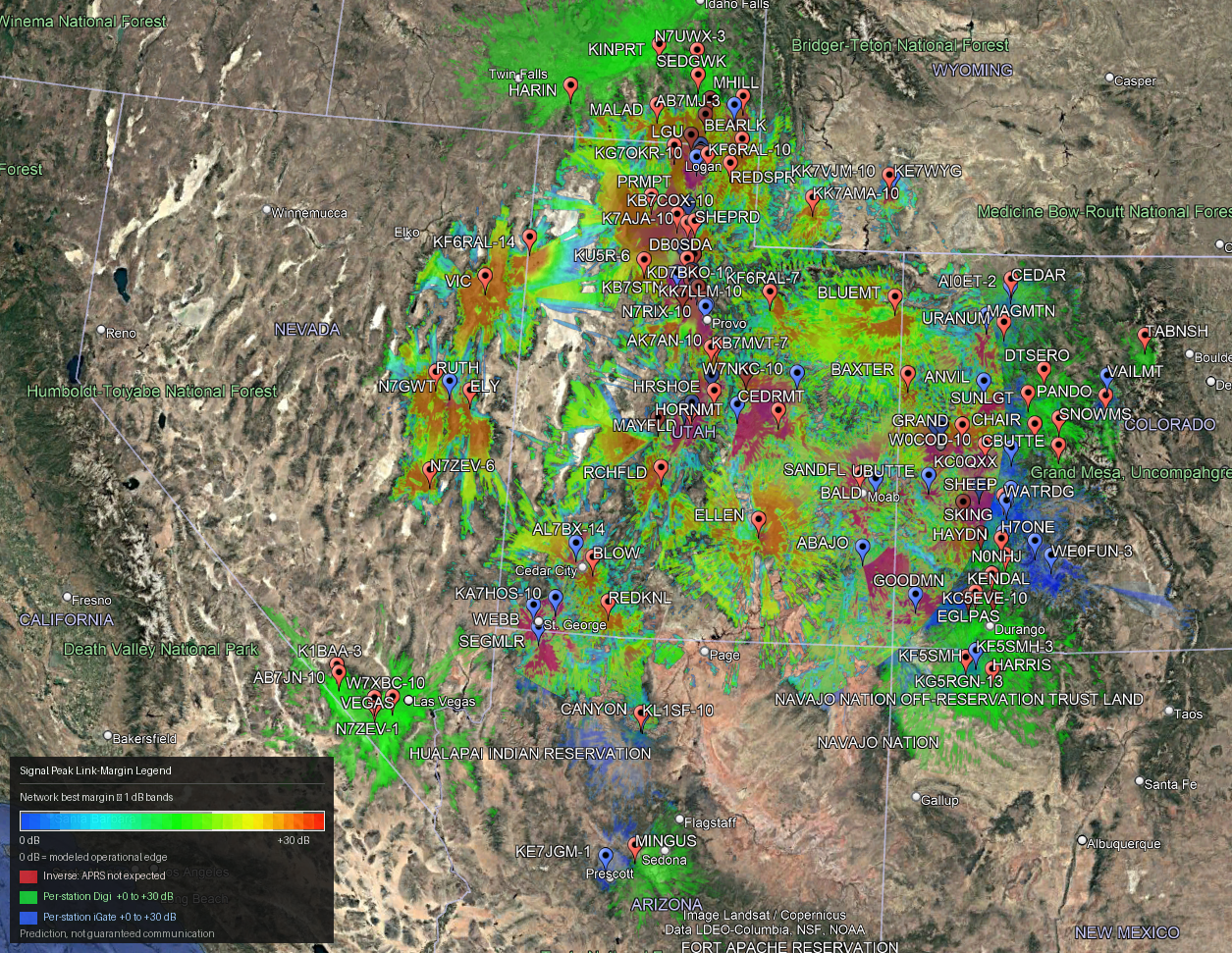
Some big changes for 2.0.0
Signal Peak 2.0 is a major update focused on terrain-detail control, resource-aware processing, safer large-area analysis, and more predictable performance.
The underlying APRS/VHF propagation model remains consistent with previous releases. Version 2.0 primarily changes how Signal Peak manages terrain resolution, memory, CPU resources, station scope, and cached terrain data.
New Terrain Detail Controls
Signal Peak now includes a dedicated Resources tab with five terrain-detail modes:
- Auto — automatically balances terrain detail, available memory, CPU resources, and run size.
- Fast — prioritizes speed and lower resource use.
- Standard — balanced terrain detail and processing time.
- High — increases terrain resolution for more detailed analysis.
- Max — prioritizes stability first and the highest practical terrain resolution second.
Max mode can be extremely slow on large jobs. Signal Peak may intentionally reduce processing to a single station at a time when necessary to prevent memory exhaustion.
The detail setting is converted into appropriate DEM resolution, analysis raster size, and parallel-worker limits for each individual run.
Dynamic Memory and CPU Management
Signal Peak can now inspect available system resources before propagation begins.
The resource planner considers:
- currently available RAM;
- total system RAM;
- logical and physical CPU resources;
- the number of stations being analyzed;
- propagation range;
- requested terrain-detail level.
Parallel worker count is then adjusted dynamically rather than using a fixed concurrency level.
The goal is to use available hardware effectively without allowing parallel workers to exceed a safe memory budget.
An optional Memory Limit can also be configured. Setting the limit to 0 leaves memory management automatic.
Whats’at mean? You can’t create a high resolution Digital Elevation Map of a large area without crashing out on memory, so in order to prevent that there is some down sampling on the front end and back end. Before a very generic limit was placed to prevent stack overflows, which meant the model would miss smaller elevation details, for example, all the ins-and-outs of canyon country. This allows you to dictate the need and want for resolution AND allows you to get max resolution for a trade off in speed while still remaining stable.
Resolution-Aware Terrain Cache
Terrain caching is now aware of the resolution requested by the current detail setting.
Previously cached DEM data is reused when it is detailed enough for the new analysis. If a run requests finer terrain than the cached product provides, Signal Peak obtains or generates the higher-resolution terrain instead of silently using the lower-detail cache.
This allows repeated runs to benefit from cached terrain while still respecting the selected detail level.
Area Analysis Scoping Fix
Area-mode station acquisition intentionally searches beyond the selected analysis radius so nearby APRS infrastructure can be discovered.
In previous builds, particularly when using a large seed file, this could result in stations outside the selected Area being included in propagation.
Signal Peak 2.0 now clips the final propagation station set to station centers located inside the selected Area radius.
The wider acquisition search remains available for station discovery, but only the requested Area is propagated.
Improved Repeat-Run Behavior
Several run-state issues have been cleaned up.
After a propagation job completes or is cancelled, Signal Peak now more reliably resets the interface for another run while preserving previous output files.
Changing the Area, Station, or Custom site also clears stale completion-state indicators so the UI accurately reflects the next analysis.
Improved Resource Guidance and Tooltips
The new resource controls include expanded operator guidance explaining:
- what each terrain-detail mode prioritizes;
- how memory affects parallel processing;
- why worker count may be reduced automatically;
- what the optional memory limit controls;
- why Max mode may take substantially longer;
- how terrain cache resolution affects reuse.
These controls are intended to provide a simple high-level choice while allowing Signal Peak to handle the underlying resource calculations automatically.
Whats’at mean? Simplified inputs while still remaining powerful, and useful plain language tooltips on hover over.
Packaging and Documentation
Version 2.0 also updates the application and release infrastructure:
- Application version updated to 2.0.0
- Windows build artifact updated to
Signal-Peak-Windows-2.0.0 - Help/About documentation updated for 2.0
- README updated
- Quick Start updated
- User Guide updated
- Resource-management documentation added
- V2 resource and terrain-cache modules included in packaged Windows builds
CONUS
The software is no longer limited to Utah! It now works for the entire Continental US.
Heatmaps
New style analysis tools including more accurate heatmaps and inverse “No coverage expected” maps.
Editable Station list
You can now edit the station list for things like Antenna Height, Power and Antenna Gain. This results in a much more accurate model for each site. Fallback goes to global defaults.
Imperial
You can now choose between Imperial and Metric units (all backend math done in the native metric) as well as choose between dBm and Watts for TX power.
What Has Not Changed
Signal Peak 2.0 does not intentionally change the established RF-model interpretation.
The existing foundations remain in place, including:
- terrain-profile analysis;
- Longley-Rice / ITM propagation;
- link-margin calculations;
- per-station RF overrides;
- station-location correction workflow;
- APRS station acquisition;
- network best-margin heatmaps;
- inverse/dead-zone coverage products.
The major difference is that Signal Peak can now decide how much terrain detail the computer can safely process, rather than relying primarily on fixed compute settings.
Summary
Signal Peak 2.0 makes large and detailed coverage studies substantially more manageable.
The operator can choose the desired balance between speed, detail, and maximum resolution, while Signal Peak dynamically manages memory, terrain resolution, caching, and parallel processing to keep the run within safe system limits.
You can find the latest release in the Software section of the tools menu. Or click here
Discussion
Leave a comment with your name. Comments appear after approval. Names are not verified.